NPU Usage
Purple Pi OH2 Yolo LLM AI NPU
The Purple Pi OH2 is equipped with a powerful Neural Processing Unit (NPU) designed to accelerate AI workloads efficiently at the edge. In this section, we explore how to utilize the NPU using RKNN and RLLM frameworks to run real-world AI applications. This includes vision-based tasks such as object detection, as well as Large Language Model (LLM) inference and voice AI processing. By leveraging the NPU, you can achieve faster performance, lower latency, and energy-efficient AI execution for embedded, industrial, and smart system applications.
Vision (NPU + YOLOv5)
Overview
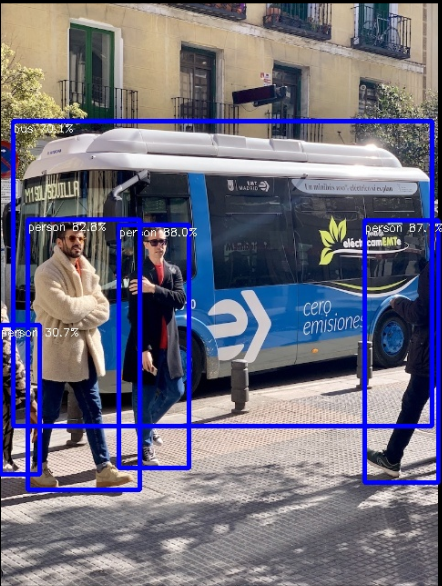
This guide demonstrates how to verify the NPU (Neural Processing Unit) on the Purple Pi OH2 and run a YOLOv5 object detection demo using the RKNN Toolkit.
Check Your NPU is Ready
Open a terminal and run the following commands:
# 1. Check NPU driver is loaded
dmesg | grep -i npu

# 2. Check NPU device exists
ls -la /dev/dri/

# 3. Check RKNN runtime library exists
ls -l /usr/lib/librknnrt.so
Expected Output
- Lines showing
RKNPUand driver information - Devices like
renderD128andrenderD129 - File
/usr/lib/librknnrt.soexists
✅ If all checks pass, your NPU is ready!
Install Required Packages
These tools are required for compiling the demo.
Download RKNN Toolkit
Navigate to YOLOv5 Demo
Check contents:
You should see:
build-linux.shmodel/src/
Set Up Compiler
Build the Demo
Build Options Explained
-t rk3576→ Chip type-a aarch64→ Architecture-b Release→ Optimized build
⚠️ Ignore minor warnings or video demo errors.
Locate Compiled Binary
Navigate to Build Directory
cd ~/Downloads/rknn-toolkit2/rknpu2/examples/rknn_yolov5_demo/build/build_RK3576_linux_aarch64_Release
Verify:
You should see:
rknn_yolov5_demo
Prepare Labels File
Make Executable
Run YOLOv5 Detection
Expected Output
Example:
Loading mode...
once run use 30.298000 ms
person @ (209 243 286 510) 0.879723
person @ (479 238 560 526) 0.870588
bus @ (93 129 553 464) 0.700761
save detect result to ./out.jpg